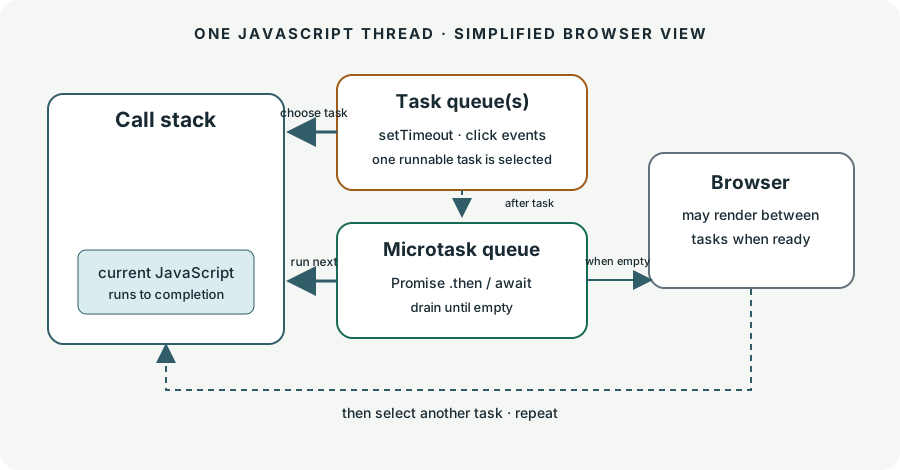
JavaScript runs one piece of code at a time. When code schedules something for later, the runtime keeps it waiting. To predict what happens next, follow three places: the call stack for code running now, the microtask queue for Promise reactions, and the task queue for callbacks such as timers and user events.
This lesson is about browser JavaScript. Node.js has additional scheduling details, so do not use this diagram to predict every Node.js case.
Read left to right: code runs on the stack. When it finishes, pending microtasks drain. Then the browser selects a runnable task; it can offer a rendering opportunity between tasks.
What goes where?
These common browser examples are enough for this trace. “Queue” means work waiting until JavaScript can run it.
Call stack: currently executing synchronous JavaScript, including the first lines of a script.
Microtask queue: Promise .then() / .catch() reactions and code after await when its Promise is settled. These run after the current JavaScript finishes and before the next task.
Task queue(s): a timer callback after its delay has elapsed, and many event callbacks. Browser standards define multiple task queues and let the browser choose among runnable tasks, so the diagram groups them for learning.
Timer detail:setTimeout(fn, 0) does not run immediately. It asks the browser to make fn eligible as a task after the delay rules allow it. It still waits for the current code and pending microtasks. WHATWG timer rules.
Trace one example
Before reading the answer, predict each logged line. Start with the synchronous lines, then decide which waiting queue runs first.
A prints. The script is running on the call stack.
2
The timer callback becomes a future task when eligible. The Promise reaction is queued as a microtask.
3
B prints before the script ends. No callback interrupts synchronous code.
4
The stack empties. The browser drains the microtask queue, so C: promise prints.
5
Then the browser can run the eligible timer task, so D: timer prints. The order is A, B, C, D.
Promise handlers are asynchronous even when the Promise is already fulfilled. That is why C does not appear between A and B. The MDN execution model describes this run-to-completion rule; the HTML Standard defines the browser queues and microtask checkpoint.
Your turn: predict the output
Type the log lines in order. Separate them with slashes. Spaces around the slash do not matter.
Keep it warm
Return to this lesson’s short review cards when they come due. The Teach library remembers review timing in this browser, so you can practice a little at a time. For a one-page recall aid, keep the event-loop quick map handy.
Next time, we can practice trickier traces with nested Promises, queueMicrotask(), and callbacks scheduled from inside callbacks. Ask me about any line in the diagram that still feels unclear.
In a browser trace, what must happen before the next task can run?
Say your answer first, then reveal the explanation.
The current JavaScript must finish, then the microtask queue must drain completely before the browser selects its next runnable task.
How easy was it to remember?
Quick recall
Why does a fulfilled Promise handler run before an eligible setTimeout callback?
Say your answer first, then reveal the explanation.
The Promise handler is a microtask. After the current stack empties, microtasks drain before the event loop selects another task such as a timer callback.
How easy was it to remember?
Quick recall
What does setTimeout(callback, 0) guarantee about when callback runs?
Say your answer first, then reveal the explanation.
It does not guarantee immediate execution. The callback becomes eligible as a task after timer rules allow it, and waits for current JavaScript and microtasks to finish.