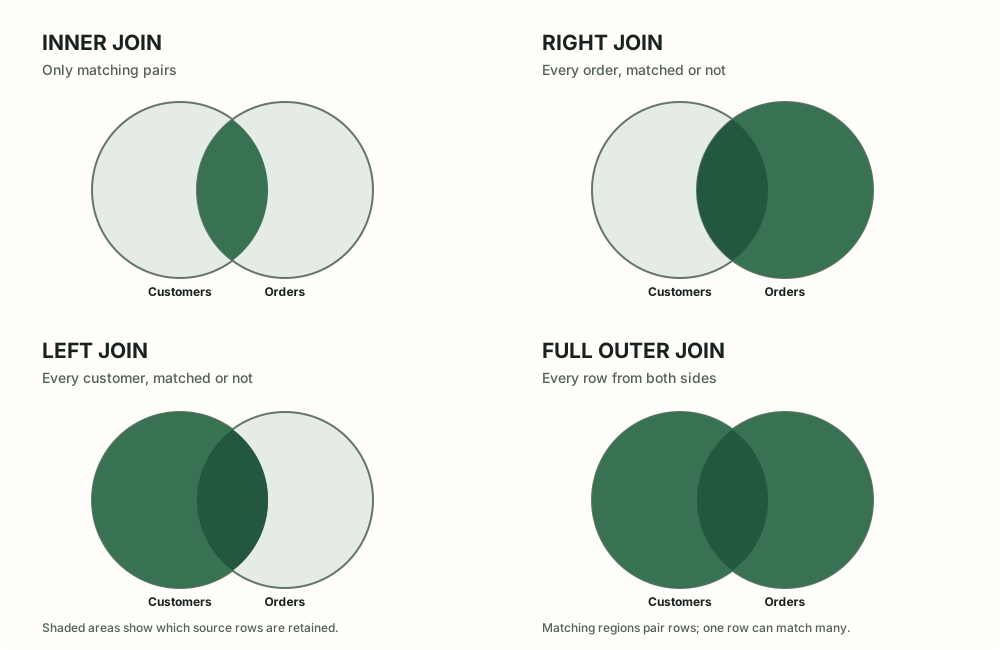
In plain English. A join lets a query put related information side by side—for example, a customer's name beside that customer's orders. The join type decides what happens when one side has no match. That choice controls which records you keep.
We will use PostgreSQL-style SQL. These join forms are widely supported. The examples use tiny tables so you can predict the result before reading it.
Customers are on the left of each diagram; orders are on the right. The shaded regions show which rows are kept. A matched pair becomes a returned row.
Start with two small tables
Imagine these rows:
customers: id
name
Meaning
1
Ada
Has orders
2
Ben
Has an order
3
Cy
Has no orders
orders: id
customer_id
total
101
1
40
102
1
25
103
2
80
104
99
12
The columns customers.id and orders.customer_id describe the same relationship. The condition after ON tells SQL which customer and order rows belong together.
Inner join: keep only matches
SELECT c.name AS customer, o.id AS order_id, o.total
FROM customers AS c
INNER JOIN orders AS o ON o.customer_id = c.id
ORDER BY c.id, o.id;
Here are the rows this query returns:
customer
order_id
total
Ada
101
40
Ada
102
25
Ben
103
80
Ada appears twice because she matched two orders. Cy has no matching order, so Cy is absent. Order 104 points to customer 99, which is missing, so that order is absent too. JOIN by itself means INNER JOIN.
A join does not promise one output row per customer. It creates one row for every matching pair. If one customer has three orders, that customer appears three times.
Left join: keep every row from the left
SELECT c.name AS customer, o.id AS order_id, o.total
FROM customers AS c
LEFT JOIN orders AS o ON o.customer_id = c.id
ORDER BY c.id, o.id;
The output now includes Cy:
customer
order_id
total
Ada
101
40
Ada
102
25
Ben
103
80
Cy
NULL
NULL
NULL here means there is no value because no matching order row exists. Ada still appears twice because she has two matches. The table written before LEFT JOIN is the left side.
Right and full outer joins
A RIGHT JOIN keeps every row from the right table. Here the right table is orders, so order 104 remains and its customer name is NULL.
SELECT c.name AS customer, o.id AS order_id, o.total
FROM customers AS c
RIGHT JOIN orders AS o ON o.customer_id = c.id
ORDER BY o.customer_id, o.id;
customer
order_id
total
Ada
101
40
Ada
102
25
Ben
103
80
NULL
104
12
It is often easier to swap the tables and write a left join instead.
A FULL OUTER JOIN keeps unmatched rows from both sides. Here it includes Cy without an order and order 104 without a customer.
SELECT c.name AS customer, o.id AS order_id, o.total
FROM customers AS c
FULL OUTER JOIN orders AS o ON o.customer_id = c.id
ORDER BY COALESCE(c.id, o.customer_id), o.id;
customer
order_id
total
Ada
101
40
Ada
102
25
Ben
103
80
Cy
NULL
NULL
NULL
104
12
In a database that enforces a valid customer reference, the orphaned order could not happen; a full join is still useful for comparing sources or finding data problems.
The word OUTER is optional: LEFT JOIN and LEFT OUTER JOIN mean the same thing.
A subtle case: ON versus WHERE
Suppose you want every customer, with details only for orders over 30. Put the amount condition into ON:
SELECT c.name, o.id, o.total
FROM customers AS c
LEFT JOIN orders AS o
  ON o.customer_id = c.id AND o.total > 30;
Cy and customers with no qualifying order stay in the result, with NULL order columns. If you instead write WHERE o.total > 30, SQL filters out those NULL rows. The left join then behaves like an inner join for that condition. This is one of the most common outer-join surprises.
More than two tables, and repeated matches
You can chain joins to answer a question that needs several tables. For example, to list each customer's product purchases, the path is customer → order → order line → product:
SELECT c.name, o.id AS order_id, p.name AS product,
       oi.quantity
FROM customers AS c
JOIN orders AS o      ON o.customer_id = c.id
JOIN order_items AS oi ON oi.order_id = o.id
JOIN products AS p    ON p.id = oi.product_id;
Each order may have several lines, so a customer can appear many times. Before joining, ask “what does one row in each table represent?” Then predict how many matches each row can have. If you join two lists of multiple matches, the result can grow quickly. Use COUNT(DISTINCT ...) only when it matches the question; it should not be used to hide an unexplained row increase.
Practice: choose the join
1. You need every customer, including people with no orders. Which join keeps them?
LEFT JOIN, with customers on the left. Unmatched order columns will be NULL.
2. You need only customers who have at least one matching order. Which join fits?
INNER JOIN. Rows without a match on either side are left out.
3. You need every customer, but only want order details for orders over 30. Where should that condition go?
Put o.total > 30 in the ON condition. A WHERE filter would remove customers whose order columns are NULL.
Keep this mental checklist
Which rows must survive even without a match?
Which columns express the relationship? Write that rule in ON.
Can a row match several rows? If so, expect repeated values and more output rows.
For a left join, should a right-side filter preserve unmatched rows? If yes, put the filter in ON.
Compact summary: inner = matches only; left = all left rows; right = all right rows; full = all rows from both sides. Unmatched columns are NULL on the missing side.